Optimizing multi-MCP workflows
Connecting an AI assistant to an MCP server is the easy part. The hard part is what happens at scale: managing ten, twenty, or fifty MCP servers across a team of developers and a fleet of AI agents, without cost, complexity, and inefficiency spiraling out of control.
Here’s what you’ll learn in this post:
- Why scaling MCP adoption creates three compounding challenges: configuration sprawl, tool overload, and orchestration inefficiency
- How a layered architecture — gateway, optimizer, and composite tools — addresses each challenge independently
- How Stacklok’s platform gives your team a governed, efficient, and consistent MCP experience without slowing down developers
I recently presented this topic at All Things AI. You can watch the full video below, or check out the slides on the All Things AI website.
The three challenges of multi-MCP
MCP’s success creates compounding problems. Each one feeds the next.
Configuration sprawl
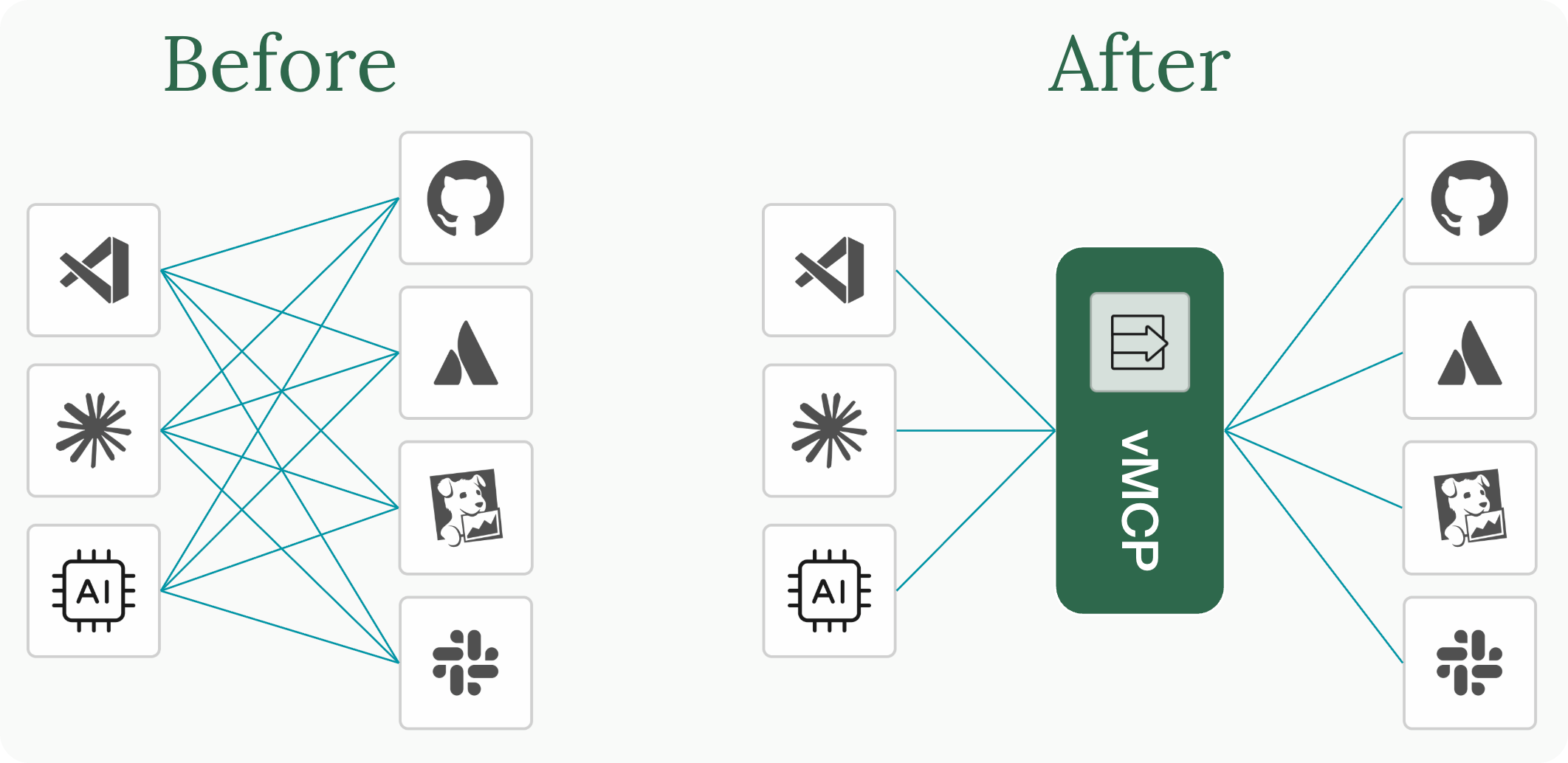
It starts innocently. You connect GitHub. Then Jira. Then Slack, your monitoring stack, a cloud provider, and an internal knowledge base. Suddenly, you have eight MCP server connections, each with its own credentials, endpoints, and transport configuration. Now multiply that across every developer on the team who needs to maintain their own copy.
Config files drift. Someone’s hitting a staging environment when they think they’re in production. An agent workflow falls behind and is using an old version of the tools. For platform teams, this is a familiar pattern from every generation of integration tooling, just happening faster because MCP adoption is moving so quickly.
Tool overload
Those eight servers don’t expose eight tools. They expose 120. Every tool definition (name, description, input schema) gets injected into the LLM’s context window on every request, whether it’s relevant or not.
We measured this directly. A simple prompt like “list my recent GitHub issues” consumed over 100,000 tokens. Not because the task was complex, but because the model was loading metadata for 114 tools. That’s expensive, and it actively degrades tool selection. The more options the LLM sees, the worse it gets at picking the right one. Most real-world multi-MCP setups blow past that immediately.
Orchestration inefficiency
Real-world tasks rarely involve a single tool call. Investigating a production incident might require pulling metrics from your observability stack, searching logs, reading a linked Jira ticket, and looking up affected customer records in Salesforce. That’s five or more tool calls across three or four systems.
Most MCP servers are built with 1:1 API-to-tool mappings, with each endpoint exposed as a separate tool. That’s clean server design, but it means the consumer pays for that granularity. Even when the LLM sequences everything correctly, every step is a round trip through inference. The model calls a tool, waits for the result, processes it, decides what to call next, and repeats. Each round trip costs tokens and adds latency for what is fundamentally coordination work, not reasoning.
And several of those calls are often independent. They could run in parallel.
A layered solution
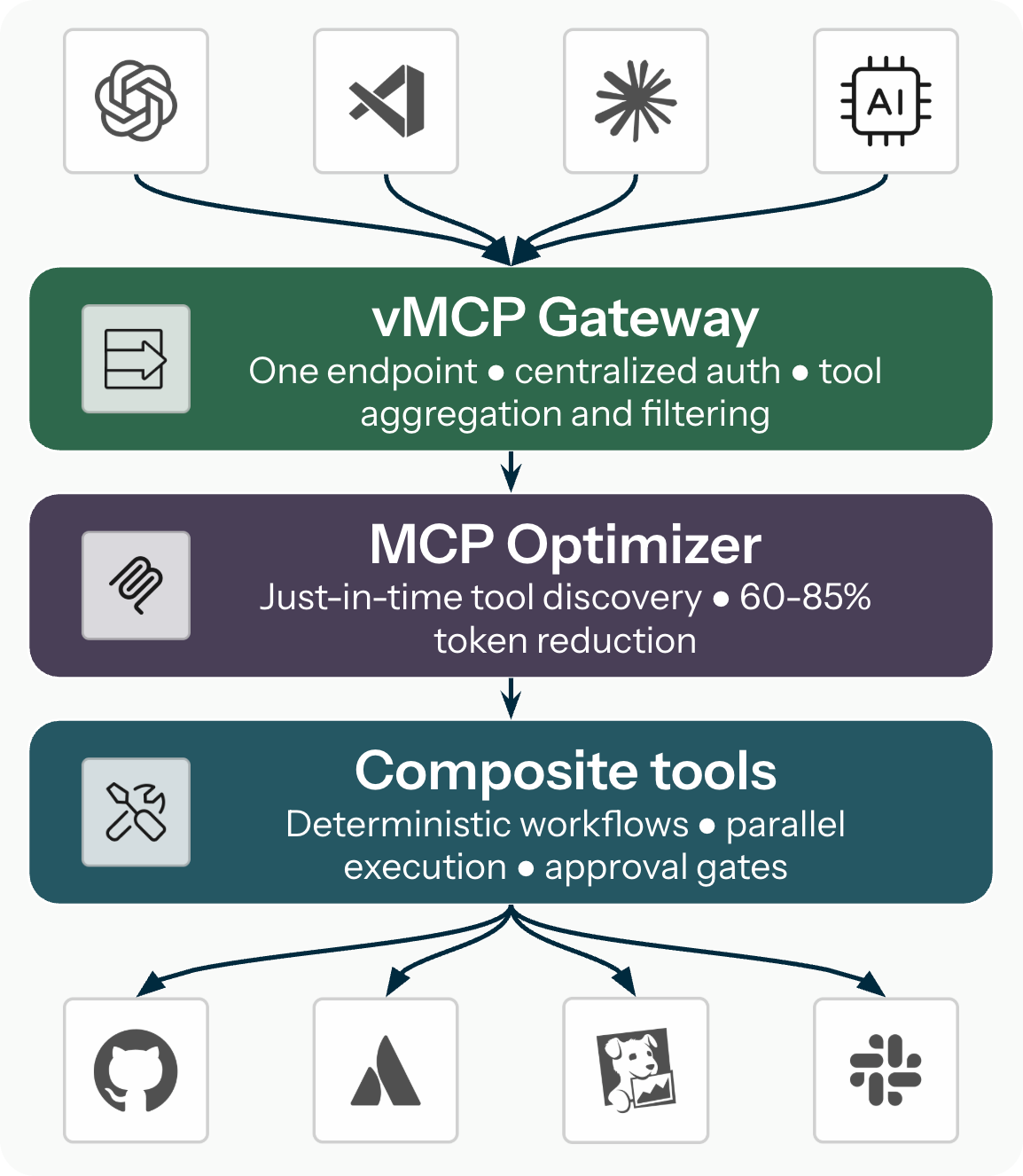
These challenges compound, but they also stack neatly, which means you can solve them layer by layer. The approach maps onto three independently valuable capabilities: a gateway for connection management, an optimizer for token efficiency, and composite tools for workflow orchestration. Each layer is useful on its own and compounds the others.
Layer 1: The vMCP gateway
The Virtual MCP Server (vMCP) runs in Kubernetes and aggregates multiple backend MCP servers behind a single endpoint. Clients connect once, to one URL, and the gateway handles the rest.
Centralized authentication. vMCP manages both incoming client auth and outgoing backend credentials via token exchange. Developers never handle raw API keys. Credentials are managed in one place, rotate automatically, and satisfy audit requirements by design.
Tool aggregation and conflict resolution. When multiple servers expose tools with the same name, vMCP resolves conflicts automatically through configurable prefixing or manual overrides. The unified tool list is clean and unambiguous.
Tool filtering and overrides. Platform teams can scope which tools each team or persona sees. An SRE gets a different tool view than a frontend developer. Tools can be renamed, restricted to specific parameter values, or hidden entirely, all without modifying the upstream MCP servers.
Dynamic discovery. vMCP discovers backend servers from the Kubernetes cluster automatically. Add a new MCP server to a group, and it’s available to clients immediately.
Your platform team defines server configurations, credentials, and policies once in Kubernetes resources. Every developer and AI agent on the team gets a consistent, governed experience through a single connection.
Layer 2: The MCP Optimizer
Even behind a single gateway endpoint, 120 tools in the context window is still 120 tools. The MCP optimizer addresses this by replacing the full tool catalog with just-in-time discovery.
Instead of loading every tool definition upfront, Stacklok’s MCP Optimizer exposes two meta-tools: find_tool and call_tool. The agent describes what it needs in natural language, gets back only the matching tool definitions, and calls them. Everything else stays out of the context window.
In our benchmarks, we observed 60-85% token reduction per request and measurable improvements in tool selection accuracy, especially for mid-sized and small models. Gemini 2.5 Flash went from 83.2% to 92.4% accuracy. A smaller open-source model jumped from 38% to 69.4%. Fewer options mean better, faster, and cheaper decisions.
The optimizer is a single switch on the vMCP gateway, and every client benefits automatically.
Layer 3: Composite tools
A composite tool is a YAML-defined workflow that chains multiple tool calls behind a single tool name. When the LLM calls a composite tool, vMCP orchestrates the execution: running independent steps in parallel, passing data between steps through templates, applying conditional logic, gating actions on human approval, and handling errors per step.
The motivation is efficiency. When the LLM needs five sequential round-trip requests to gather context for a task, a composite tool collapses that into one invocation with parallel execution. This saves tokens, latency, and inference cost. It also hides upstream API granularity from the model: a server that exposes twelve fine-grained endpoints becomes one task-level tool from the assistant’s perspective, without modifying the server itself.
And because workflows are defined in YAML rather than prompts, they’re version-controlled, testable, and consistent across model upgrades. No more worrying about whether your system prompts correctly instruct the LLM on the right tool sequence every time.
Where composite tools are heading. Two areas are in active development. MCP sampling would let workflow steps request model completions like summarizing intermediate data or classifying results, bringing controlled inference into the workflow without giving up determinism. A script engine (replacing Go templates with something like Starlark) would make data transformation between steps more expressive without requiring an LLM call for every field extraction.
What moves where
The shift is about placing each concern where it belongs:
- Configuration moves to the platform team: defined once in Kubernetes resources, one URL per team.
- Tool discovery moves to the optimizer: automatic, just-in-time, and you pay only for what you use.
- Orchestration moves to declarative config: YAML, version-controlled, testable, and independent of model choice.
- Reasoning stays with the LLM: understanding the problem and synthesizing results, the work it’s actually built for.
The common thread: stop using the most expensive compute in your stack as a coordinator and let it do the reasoning.
Getting started
Start where it hurts most.
If your immediate pain is configuration management like credential sprawl, per-developer config files, or tool conflicts, start with the vMCP gateway. It delivers immediate value with the lowest setup effort.
If token costs are climbing or your LLM is picking the wrong tools, enable the optimizer. It’s a single switch on the gateway.
If you have specific multi-step workflows where the LLM is doing coordination work that doesn’t require reasoning, explore composite tools. They offer the highest leverage with the most design effort and the most room to grow as MCP sampling and scripting capabilities mature.
Want to see what Stacklok can do for your organization? Book a demo or get started right away with ToolHive, our open source project. Join the conversation and engage directly with our team on Discord.
May 13, 2026
Last modified on June 05, 2026

Dan Barr
Senior Technical Marketing Engineer
Dan Barr is a Senior Technical Marketing Engineer and the primary architect of Stacklok's top-notch docs, tutorials, how-to guides and more that help customers and users navigate all things MCP.
More by Dan Barr