Multiplying the Value of AI Agents and Driving Developer Productivity Gains
In a span of just three months, a Fortune 500 Financial Services firm multiplied the value of their AI agents. The key to their transformation was connecting AI agents to data and systems behind their corporate firewall. This was no small feat in a regulated industry and at a company that placed a heavy emphasis on security, but a small, focused team overcame obstacles to optimize agent context with a platform grounded in the Model Context Protocol (MCP).
Now, the company has deployed more than 100 MCP servers into production with centralized governance and more than 500 employees access servers at least once per week. AI agent completion rates have increased, and using MCP servers, developers are shipping code faster and with lower error rates. In a short window of time, the team drove a massive impact on company-wide productivity.
Setting the Stage
In the fall of 2024, the company’s software development team licensed Cursor and Claude Code, respectively, for developer use. The plan was to make these assistants available to all software developers as a way to increase their productivity and ship more code, faster. However, six months after making these assistants internally available, software developers were frustrated. Cursor and Claude Code completion rates were poor, usage of these assistants was declining and there was no measured bump in developer productivity. An internal team was assembled to assess and remedy the situation.
The Challenge
The core issue was readily apparent. Both Cursor and Claude Code had been trained on publicly available information, but not on the company’s data and systems. In essence, the company had AI coding assistants that were built for any enterprise, but what they needed were assistants that understood and could act on their systems.
The team tasked with solving this issue considered building custom integrations, but realized this was not sustainable or scalable, and so they explored how the Model Context Protocol (MCP) could help them connect AI coding assistants to the context behind their corporate firewall. They quickly identified this as the right path for their enterprise, but as a highly regulated operation, they also recognized they would need to build security guardrails and centralized controls that were absent in the MCP spec.
See Stacklok in Action
Ready to govern your AI toolchain?
Get a personalized walkthrough of how Stacklok secures MCP servers, enforces policies, and gives your team full visibility.
The Goals
The team at this Fortune 500 FSI envisioned an MCP solution that would first allow developers — and eventually all knowledge workers — to securely connect to a catalog of trusted MCP servers. The intent was to keep the user experience as automated as possible to facilitate adoption. And to address internal compliance requirements, the team wanted to make it simple for employees to run MCP servers in containers that were hosted in their private cloud.
Finally, the project team knew they needed a solution that could operate at scale. Already, the organization had 6,000+ GitHub repositories and 10,000+ daily commits, plus a JFrog Artifactory with 40 million artifacts and a Google Big Query table with 160 petabytes of data. And so they set out on a multi-step journey to deliver optimal context to their AI coding assistants and radically transform developer productivity.
Step 1: Establish a Runtime
The first step for any MCP solution is to establish a runtime. In this case, the runtime had to operate in their air-gapped private cloud. The project team wanted a React-based web framework to automate repository creation, image scanning, deployment processes and more.
Stacklok’s Enterprise MCP Platform had immediate appeal; the solution allowed the company to ensure consistency and control across workflows. Stacklok made it easy for them to containerize every MCP server and then deploy, run and manage those servers in a Kubernetes cluster. Stacklok also offered the bells & whistles … And so, the project team could turn their attention to step 2, diving headlong into security considerations.
Step 2: Build a Secure and Isolated Connection
In addition to the project team, the company’s security team was involved from the outset of the project. They outlined requirements and access restrictions for an MCP gateway.
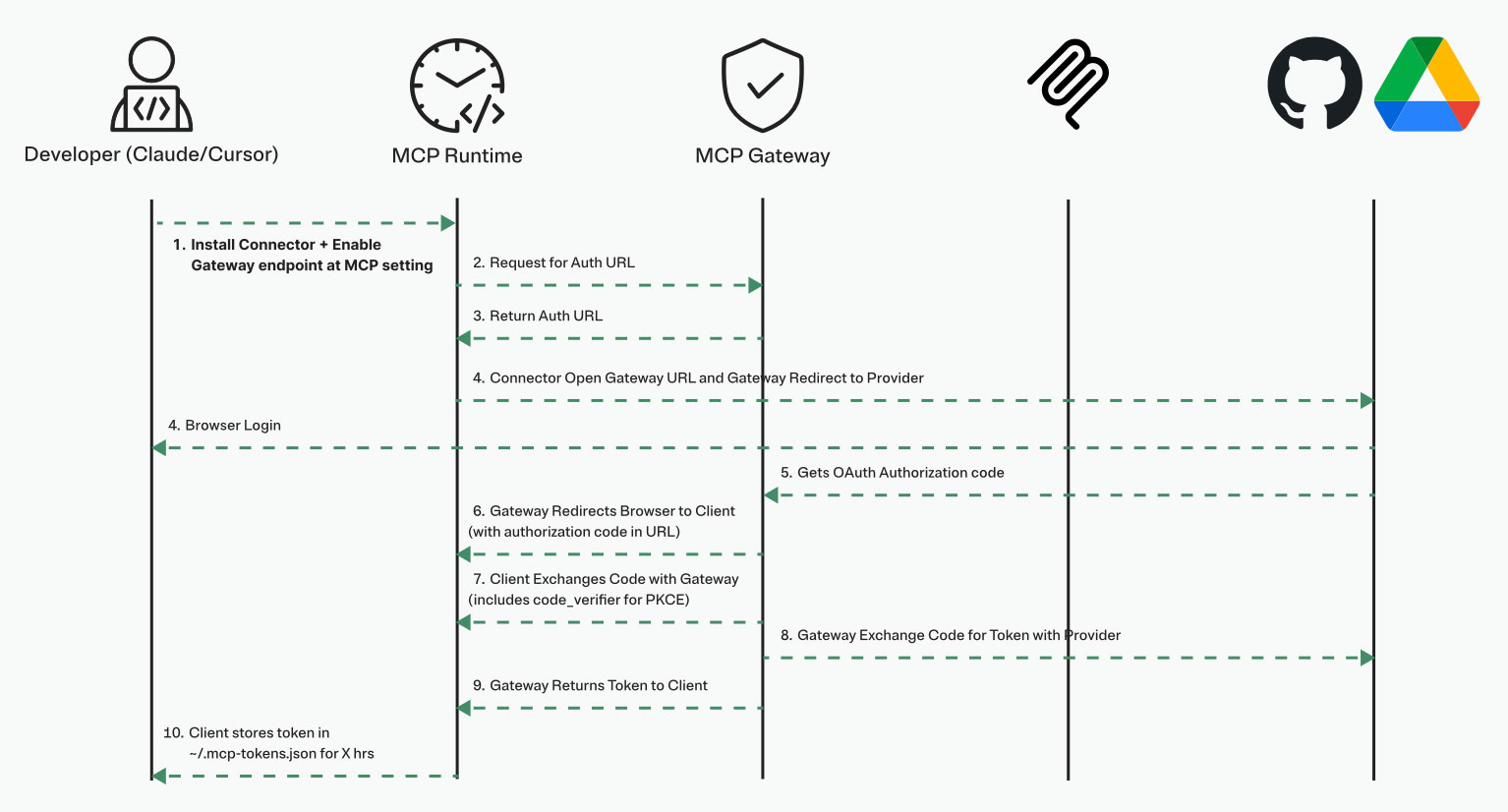
The project team started by solving authentication, implementing a flow that used OAuth 2.0 (consistent with the MCP spec) and Proof Key Code Exchange (PKCE). On this foundation, the team added more advanced features, including request routing, authorization and session management. The team further secured their environment with federated token exchange and network isolation of MCP servers; both of these capabilities were only available via Stacklok, consistent with the solution’s focus on enterprise requirements.
In addition to technology, they introduced specific risk mitigation practices:
- Use only internally approved base images and packages
- Enforce token expiry
- Prevent hard coded secrets
- Apply least privilege principles
- Review configurations and permissions on a defined cadence
And finally, to address security team requirements (and ensure tight iteration loops on their MCP solution) the team invested time to build proper monitoring. Today, they track and report on: MCP gateway reliability, MCP server usage and performance, infrastructure health and accepted vs. rejected codebase additions. Stacklok allowed the project team to integrate monitoring into their existing observability solution (New Relic), enforce data retention policies and maintain audit logs.
Step 3: Curate a Registry of Trusted MCP Servers
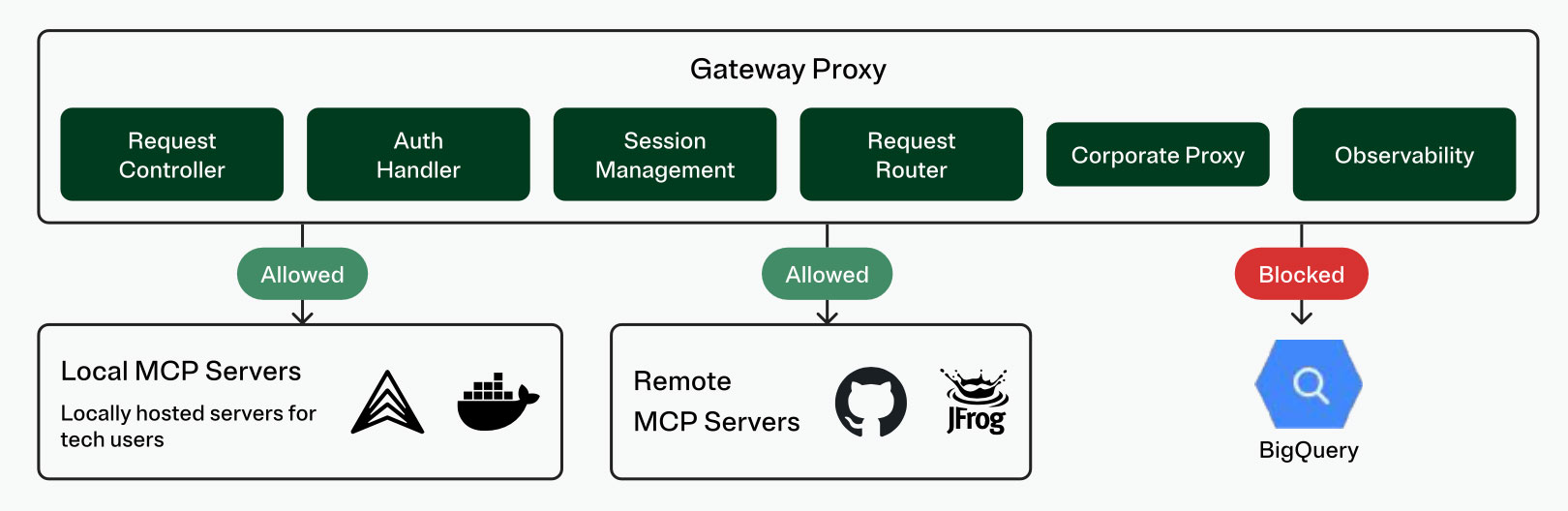
With a runtime and gateway in place, the team was ready to curate a registry of trusted MCP servers. A tightly scoped set of MCP servers that represented business critical data and systems were hosted in their private cloud via Stacklok. A wider set of MCP servers were available for use by non-technical roles.
Every MCP server must be validated by a central team before being included in the registry. Employees are blocked from using unapproved MCP servers and the team’s centralized controls include network policies and permissions that restrict access to MCP servers. Each MCP server is preconfigured for employees, so they can be readily discovered and then installed with a single click.
Step 4: Pilot the Self-Service Model
The project team now had a working solution, and it was time to pilot with a group of technical users. Those users were able to discover and deploy MCP servers, while the underlying solution handled all authentication, token exchanges and metadata such that the user experience was seamless.
The team measured the impact, and it was immediate. Code completion acceptance for both Claude Code and Cursor increased markedly, and developer usage rates of these assistants also climbed. There were early indications that developers using the MCP solution were producing more code with lower error rates.
Step 5: Scale MCP in Production
With compelling pilot results and effective solutions for all security and compliance requirements, the company was ready to roll out their MCP solution. In just three months, the team went from significant challenges with coding assistant usage and ROI, to an architecture for an MCP solution, to a pilot, to full production deployment. At the end of this window, the company had more than 500 employees accessing MCP servers at least weekly, with more than 100 MCP servers in their registry.
Step 6: Exploring New Solutions
While the MCP spec defines a one-to-one relationship between a client and server, there are situations where multiple tools from multiple servers are needed to complete a task. As this Fortune 500 FSI is an early adopter of MCP in production, they have also been early to recognize the opportunity to group tools from servers via a ‘virtual’ MCP server.
The company wants a developer to be able to start a virtual MCP server that consolidates multiple tools into a single endpoint. The developer won’t need to manage multiple connections or worry about custom configurations; the virtual MCP server enables granular tool selection instead of exposing entire catalogs. And a virtual MCP can bolster security by ensuring API keys aren’t injected into LLM context by substituting parameters for environment variables.
Fortunately, the Stacklok team has been building similar capabilities, and formal co-development has kicked off on the virtual MCP server. The teams are keeping it simple with easy extensions, templates for different environments and consistent naming schemas.
A Collaborative Approach
The project team first found ToolHive as an open source project and engaged with Stacklok engineers via Discord. As the project team pushed the boundaries of ToolHive, they surfaced ideas for new capabilities; as the Stacklok team delivered innovation and support, trust was established.
ToolHive underpins critical portions of the company’s MCP solution. ToolHive provides the runtime; whereas other MCP solutions operate via a SaaS model, ToolHive allows the company to operate their MCP solution from an air-gapped private cloud. The company uses ToolHive’s Kubernetes Operator to orchestrate their footprint and manage MCP at scale and uses ToolHive’s federated token exchange as an essential security measure.
The company’s gateway also leans on Stacklok, with integrations into the company’s existing IDP, observability tool and more. And it’s Stacklok that is helping them realize their vision for a virtual MCP (step 6 above), by offering a single endpoint from which their employees can securely and efficiently access tools. The project team has recently enabled Stacklok’s MCP Optimizer functionality to filter out useless tool metadata, reducing their token use by more than 50% and improving model performance.
And finally, Stacklok’s Enterprise MCP Platform is the backbone of the company’s MCP server registry. Stacklok is fully integrated with the official upstream MCP registry, so they can draw from those servers, as well as quickly and simply add their own trusted servers.
Most importantly, the company’s project team and the Stacklok team have built a strong, collaborative relationship. There is an open exchange of ideas as the two parties push the open source project forward, and drive more value from the company’s MCP solution and broader AI investments.
Business Impact
In summary, Stacklok was able to partner closely with this Fortune 500 FSI to put MCP into production. As a result, the company is turning their internal data into knowledge, and that knowledge into action. More than 500 employees use one or more MCP servers at least weekly. AI agent usage has increased and completion rate and acceptance rate have climbed considerably. In just three months, the company led an internal transformation that has them shipping more code, faster and with lower error rates.
Ready to see it live?
Get a demo of the Stacklok platform
See how leading teams govern MCP servers and enforce security across their AI toolchain.