Your AI agent doesn’t deserve root access
The power of coding agents is inseparable from risk. The question isn’t whether something will go wrong; it’s how far the damage can travel when it does.
Here’s what you’ll learn in this post:
- Why containers alone aren’t sufficient isolation for LLM-driven processes
- How hardware-isolated microVMs create a meaningful security boundary for coding agents
- How Stacklok bounds the blast radius with network controls, secret exclusions, and change review
- How to get a disposable, fully isolated coding agent environment up and running immediately
You set up Claude Code. You give it your workspace, your API key, and the ability to run whatever commands it thinks are necessary. Then you walk away to grab coffee.
By the time you’re back, the agent has read your .env file while scanning the project structure. It ran a one-liner it found in a GitHub comment. It pip installed a package that pulled in a dependency chain nobody has audited. It fetched documentation from a URL that contained a prompt injection telling it to curl your SSH keys to a remote server.
These are just the natural consequences of giving an LLM-driven process access to a shell and a network connection. The same access you’d hesitate to give a junior contractor you just met.
Coding agents are powerful. But that power is inseparable from risk. The question isn’t will something go wrong. It’s: when something does go wrong, how far does the damage travel?
We spent some time building an answer to that question. The short version? You run bbox claude-code and your agent gets a full, disposable Linux environment inside a hardware-isolated microVM. Your secrets never enter the VM. The network is firewalled below the application layer. And when the session ends, you review every change before a single byte touches your real workspace.
Here’s how the pieces fit together:
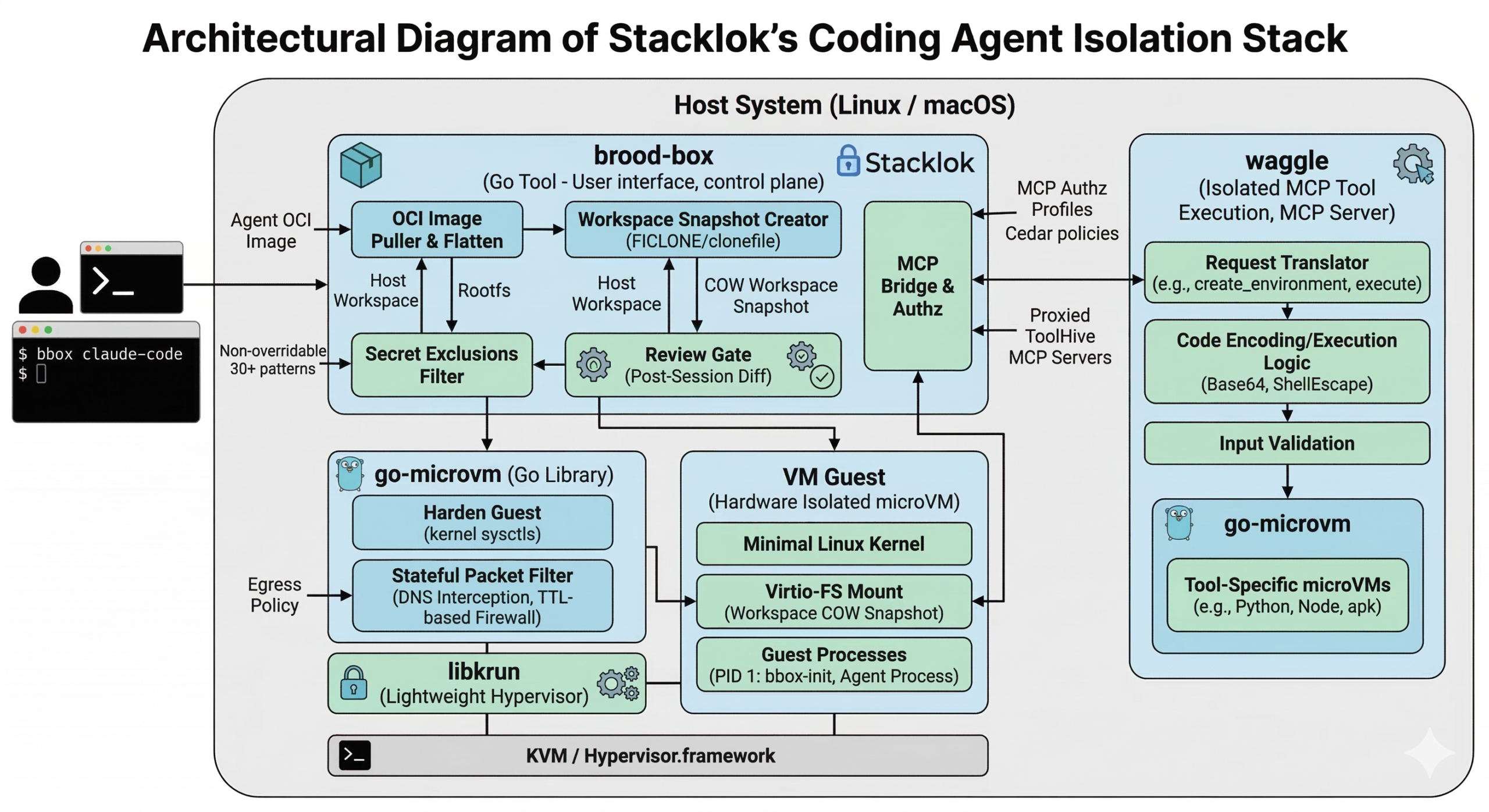
brood-box is what actually runs your coding agent. waggle is what runs MCP tools in isolation. go-microvm is the microVM library powering both of them. And libkrun is the lightweight hypervisor underneath it all.
You know that --dangerously-skip-permissions flag in Claude Code? The one with the name that’s basically begging you not to use it? Inside a brood-box VM, that flag is how the agent actually gets work done. It can write files, run tests, install packages, commit code, all without stopping to ask “may I?” every thirty seconds. The isolation makes the flag boring. And boring is exactly what you want from security infrastructure.
That’s the destination. Now let’s talk about how we got there, starting with why the obvious answer doesn’t work.
Let’s dig in…
Containers feel safe. Are they safe enough?
One reason why people keep reaching for containers to isolate untrusted workloads is because they’re familiar. Namespace isolation, a limited filesystem view, resource controls via cgroups. Fast, portable, built on OCI images you already have.
But here’s the thing: containers share the host kernel. Every container on your machine, and every container in your multi-tenant cloud environment, makes syscalls into the same kernel. A kernel vulnerability is a vulnerability in every container simultaneously.
Recent container escape vulnerabilities show just how thin the isolation boundary really is — and each one maps to something an AI agent could realistically trigger:
- A malicious agent that generates or modifies Dockerfiles could introduce symlink races that exploit runc’s TOCTOU window during container initialization (CVE-2025-31133, CVE-2025-52565, CVE-2025-52881), gaining read-write access to host
/procpaths and executing arbitrary commands as root via kernel coredump helpers. - A malicious agent fetched from a public registry that runs on GPU-accelerated containers could hijack NVIDIA Container Toolkit initialization hooks via a three-line
LD_PRELOADDockerfile directive (CVE-2025-23266, CVSS 9.0), achieving complete server takeover with no kernel bug or special privileges required. - A containerized agent writing crafted data to
/proc/dockerentries could trigger an out-of-bounds read in Docker Desktop’s gRPC-FUSE kernel module (CVE-2026-2664), leaking sensitive host memory and chaining with other vulnerabilities to escalate to full host compromise. - A compromised agent running in a privileged container could load eBPF programs that exploit verifier bypass bugs (CVE-2020-8835, CVE-2021-3490, CVE-2021-4204, CVE-2022-23222), escaping the container and — as the LinkPro rootkit demonstrated in late 2025 — hiding its own presence from monitoring tools entirely.
One kernel exploit, and the container boundary disappears.
For most workloads, that tradeoff is acceptable. For dynamically generated, LLM-produced code that might be influenced by untrusted external inputs? Not so much.
So… why not just use VMs?
VMs provide something containers cannot: a separate kernel. The guest OS lives behind a hardware memory management unit that the hypervisor controls. Even if an attacker achieves full root inside the guest, they’re still inside the MMU boundary. Getting out requires a hypervisor exploit, which is a substantially higher bar than a kernel exploit, and a much smaller attack surface.
The catch has always been overhead. Traditional VMs take minutes to boot, gigabytes of RAM, and significant CPU overhead. That’s too expensive for ephemeral workloads.
But that gap has closed. MicroVMs, stripped-down VMs designed to boot in under a second, run a minimal Linux kernel, and consume 50-100 MB of RAM, make hardware isolation practical for the same use cases where you’d reach for containers. AWS Firecracker powers Lambda with this model. Kata Containers uses it for container workloads with VM-level isolation.
Enter libkrun: a C library backed by KVM on Linux and Hypervisor.framework on macOS that makes microVM isolation available as a linkable library. We built our stack on it. Let me show you what that looks like.
go-microvm: OCI images as microVMs
go-microvm is a Go library that takes any OCI container image and runs it as a hardware-isolated microVM. The API is designed to feel like what you already know:
vm, err := microvm.Run(ctx, "python:3.12-alpine",
    go-microvm.WithCPUs(2),
    go-microvm.WithMemory(512),
    go-microvm.WithPorts(go-microvm.PortForward{Host: 8080, Guest: 80}),
)
defer vm.Stop(ctx)Same registries, same Dockerfiles, same environment inside the VM. No new image format. No new toolchain. OCI compatibility isn’t a convenience feature here. It’s the adoption path. If the answer to “how do I try this” is “rewrite your images,” nobody will try it. We’ve all been there.
Under the hood, go-microvm pulls the image layers, flattens them into a rootfs, and applies extraction defenses (path traversal checks, symlink validation, decompression bomb limits) before handing the rootfs to libkrun, which boots a Linux kernel in a VM and starts the container’s entry point.
What about the network?
Remember that prompt-injected agent from the opening? The one that tried to curl your SSH keys to a remote server? go-microvm includes a stateful packet filter that makes sure that never works.
You can express policies like: “this VM may only make outbound HTTPS calls to api.anthropic.com“:
microvm.WithEgressPolicy(go-microvm.EgressPolicy{
    AllowedHosts: []go-microvm.EgressHost{
        {Name: "api.anthropic.com", Ports: []uint16{443}},
    },
})The implementation intercepts DNS queries, returning NXDOMAIN for non-allowed hostnames. For allowed hostnames, it snoops the DNS A-records and creates time-limited firewall rules that expire when the DNS TTL does. Everything else is default-deny. Hardcoded IPs don’t bypass this either: they’re blocked because they were never learned from DNS.
So even if an agent gets prompt-injected, it can’t exfiltrate your credentials to an attacker-controlled server. The VM simply can’t resolve the hostname. The firewall operates below the application layer, where the agent has no influence.
Hardening the guest
The guest Linux environment is hardened at boot. go-microvm ships a guest/harden package that applies kernel sysctls before any workload runs:
kernel.unprivileged_bpf_disabled=1– No BPF programs from unprivileged userskernel.yama.ptrace_scope=2– NoptracewithoutCAP_SYS_PTRACEkernel.kptr_restrict=2– Kernel pointers hidden from all userskernel.perf_event_paranoid=3– No perf events for unprivileged usersnet.core.bpf_jit_harden=2– BPF JIT constant blindingkernel.dmesg_restrict=1– Dmesg restricted to privileged userskernel.sysrq=0– Magic SysRq key disabled
After completing privileged setup, the init process calls PR_SET_NO_NEW_PRIVS, ensuring that no child process can gain privileges through setuid binaries or file capabilities. Capabilities are dropped to the minimal set needed to run the guest SSH server (chown, setuid/setgid, kill, net_bind_service, and that’s it). Even inside the VM, the attack surface for privilege escalation is deliberately small.
Defense in depth isn’t one thing. It’s what happens when you treat every layer as potentially compromised and harden accordingly.
waggle: Isolated code execution for MCP tools
go-microvm gives you microVM isolation as a library. But AI agents don’t call Go libraries directly. They need something they can actually talk to.
Say you’re building an agent that needs to run user-submitted Python, analyze a dataset with pandas, or test a code snippet in Node. You need a real environment with real package managers — but you don’t want that code running anywhere near your host. waggle gives agents exactly that: on-demand, disposable Linux environments with hardware isolation, accessible through a standard tool interface.
Think of it as a translator between what the agent wants (“create me a Python environment,” “run this code”) and what go-microvm provides (microVMs). waggle handles spinning up the VM, executing the request inside it, and returning structured results. The agent never has to know it’s talking to a VM. It just gets tools that work.
Under the hood, waggle is an MCP (Model Context Protocol) server. MCP is the emerging standard for giving AI agents structured access to capabilities — a protocol for discovering and invoking tools instead of trying to type into a terminal. waggle exposes eight of them:
| Tool | What it does |
|---|---|
create_environment | Spin up a Python, Node, or shell microVM |
execute | Run code and capture stdout/stderr/exit code |
write_file | Create or overwrite a file in the VM |
read_file | Read a file back out |
list_files | Browse a directory |
install_packages | pip install, npm install, or apk add |
list_environments | See all active VMs |
destroy_environment | Tear down a VM |
Each environment is a real microVM. When an agent calls install_packages with numpy scipy matplotlib, it’s doing a real pip install in an Alpine Linux guest. The packages don’t persist anywhere near your host system. When the environment is destroyed, the VM is gone. Forget to destroy it? Environments auto-expire after 30 minutes of inactivity. No zombie state, no leaked mounts.
Note that the code execution path is worth looking at. Rather than passing user code as a shell argument (which creates injection opportunities), waggle base64-encodes the code, pipes it through printf | base64 -d into a uniquely-named temp file, executes it, then deletes it. Every user-provided string that touches a shell command is processed through ShellEscape(). Package names are validated against a strict regex before reaching a package manager. These are exactly the kind of injection vectors that container-based execution usually papers over.
brood-box: Running coding agents safely
go-microvm is the isolation engine. waggle is the MCP bridge for tool-calling agents. But the most common use case is different: you want to point Claude Code (or Codex, or OpenCode) at your actual repository and let it work.
That means the agent needs your source files. It needs to write code, run tests, install dependencies. But giving it direct access to your host means everything it does happens for real. A shell command runs with your user’s full permissions. A developer asked Claude Code to clean up packages and it generated rm -rf tests/ patches/ plan/ ~/. That trailing ~/ expanded to their entire home directory. Another startup lost 2.5 years of production data when the agent ran a Terraform destroy using cloud credentials it found in the workspace.
brood-box solves this. It gives your coding agent a complete copy of your workspace inside a microVM. The agent works freely — writes files, runs tests, installs packages — but on a disposable snapshot. Your real workspace is untouched. When the session ends, you review every change before a single file lands. The pitch:
bbox claude-codeAnd that’s it! Well, sort of. That command:
- Creates a copy-on-write snapshot of your workspace (using
FICLONEon Linux,clonefile(2)on macOS, near-instant even for large repositories) - Pulls the Claude Code OCI image, extracts the rootfs, injects an SSH keypair and a custom init binary
- Boots a microVM with the workspace snapshot mounted as a virtio-fs share
- Drops you into an interactive PTY session inside the VM
- When you exit, stops the VM first, then shows you a per-file diff review
- You accept or reject each change; accepted changes are flushed back with hash re-verification
- The snapshot is deleted
The COW snapshot is the key move for safety. During the session, the agent is operating on a copy. Your real workspace is untouched. If the agent does something catastrophic (deletes files, corrupts data, or just gets confused and writes garbage), you close the session and nothing happened. The review gate gives you final say on every file before it lands.
The VM is explicitly stopped before review begins. This prevents a scenario where the agent modifies files while you’re reviewing them. Files are also re-hashed between the diff and the write-back, so if anything changed between the time you reviewed a file and the time it gets written (a time-of-check-to-time-of-use race), brood-box catches it.
What the agent can’t see
Remember the .env file from the opening? The one the agent casually read while scanning your project? brood-box enforces non-overridable exclusions from the snapshot. Files matching these patterns never enter the VM. Period:
.env*– environment and secret files*.pem,*.key,*.p12,*.pfx,*.jks– certificates and private keys.ssh/,id_rsa*,id_ed25519*,id_ecdsa*– SSH keys.aws/,.gcp/,.gcloud/,.azure/– cloud credentials.kube/config,.vault-token,.gnupg/,.pgpass– infrastructure credentials.git/config,.netrc,.npmrc,.pypirc– files that may embed tokens*.tfstate*,*.tfvars,.terraform/– infrastructure state with secretscredentials.json,.docker/config.json,.config/gh/hosts.yml– auth files
That’s 30+ patterns covering secrets across every major ecosystem. They cannot be negated by .broodboxignore or --exclude. An agent that has been handed a prompt injection via a malicious file in your repository cannot instruct brood-box to “include the .env file this time.” The exclusions are enforced unconditionally, in a two-tier matcher that evaluates security patterns in a separate pass from user-overridable performance patterns.
Similarly, per-workspace .broodbox.yaml files cannot disable snapshot isolation or widen the egress firewall. An untrusted repository cannot reconfigure the security properties of the tool that runs agents against it. With this in mind, you can confidently point brood-box at repos you don’t fully trust.
What about network access?
Network access from within the VM is controlled by three egress profiles:
- locked – Only the LLM provider’s API endpoint. Nothing else.
- standard – LLM provider plus common developer infrastructure: GitHub, npm, PyPI, the Go module proxy, Docker Hub, GHCR.
- permissive – All outbound traffic, no restrictions.
The default is permissive (practical for development); the locked profile is what you want in a CI pipeline or when running an agent against a repository you don’t fully trust.
What about the tools?
The egress firewall controls where the agent can connect. But there’s another attack surface: the MCP tools themselves.
When ToolHive is running on your machine, brood-box discovers its MCP servers and proxies them into the VM so the agent can call external tools. That’s useful, but think about what happens when a prompt-injected agent has access to a GitHub MCP server, or a Slack server, or a database management tool. The agent never leaves the VM. The egress firewall blocks unknown hostnames. But those tools have side effects that reach well beyond the sandbox. Delete a branch. Post a message. Drop a table.
So we added MCP authorization profiles. The idea: restrict what MCP operations the agent can perform, not just where it can connect.
# Agent can list and read MCP capabilities but cannot call any tools
bbox claude-code --mcp-authz-profile observe

# Agent can call tools that declare themselves safe
bbox claude-code --mcp-authz-profile safe-toolsFour profiles are available:
| Profile | What the agent can do |
|---|---|
full-access (default) | All MCP operations, no restrictions |
observe | List and read tools, prompts, and resources only |
safe-tools | Observe + call non-destructive, closed-world tools |
custom | Operator-defined Cedar policies |
The safe-tools profile is the interesting one. MCP tools can carry annotations that describe their behavior: readOnlyHint, destructiveHint, openWorldHint. brood-box evaluates these at request time using Cedar policy when clauses:
permit(principal, action == Action::"call_tool", resource)
  when { resource has readOnlyHint && resource.readOnlyHint == true };

permit(principal, action == Action::"call_tool", resource)
  when { resource has destructiveHint && resource.destructiveHint == false
&& resource has openWorldHint && resource.openWorldHint == false };A tool marked readOnlyHint: true is allowed. A tool that is both non-destructive and closed-world (it only affects known, bounded resources) is also allowed. Everything else hits Cedar’s default-deny. Tools that don’t carry annotations at all? Denied. This matches the MCP spec’s conservative defaults without needing special-case code for each tool.
For operators who need finer control, the custom profile lets you write your own Cedar policies. Under the hood, brood-box runs an embedded instance of ToolHive’s Virtual MCP Server (vMCP), the same component that aggregates and authorizes MCP traffic in ToolHive’s Kubernetes operator. You define policies in a simple config file, and brood-box infers the custom profile automatically:
# mcp-config.yaml (passed via --mcp-config)
authz:
  policies:
    - 'permit(principal, action == Action::"list_tools", resource);'
- 'permit(principal, action == Action::"call_tool", resource == Tool::"search_code");'bbox claude-code --mcp-config ./mcp-config.yamlThe same tighten-only merge semantics from the egress firewall apply here. A per-workspace .broodbox.yaml can tighten the authz profile (say, from safe-tools down to observe), but it can never widen it. And custom can only be set from the global config or CLI flags. A malicious repository cannot supply its own Cedar policies via a checked-in config file.
bbox-init: the guest’s PID 1-ish
Inside every VM, the init process is bbox-init, a Go binary compiled as a static executable and injected into the rootfs before boot. It handles mount setup, network configuration, and runs an embedded SSH server. No shell scripts, no system sshd, no iproute2.
This matters because it eliminates an entire class of attack surface. There’s no init system to manipulate, no service manager to query, no dbus socket to speak to. The guest’s entire initialization path is a single Go binary that’s been compiled from source and embedded into the host binary at build time.
Bounding the blast radius
So, basically, the model comes down to this: LLM-generated code is not like code written by a human engineer. It is generated at runtime, influenced by inputs that include untrusted content: files in your repository, documentation fetched from the web, tool outputs from MCP servers you didn’t write. An agent can be prompt-injected. An agent can misunderstand context. An agent can confidently execute something harmful.
This doesn’t make agents useless. It makes them require the same discipline we apply to any untrusted input. We don’t run user-uploaded files directly on production servers. We don’t execute SQL strings without parameterization. We shouldn’t run agent-generated code without an isolation boundary.
Containers are a start (filesystem isolation, process namespaces) but they share the kernel, and the history of container security is a history of kernel vulnerabilities that bypassed namespace isolation.
MicroVMs fix the kernel problem. Each VM runs its own kernel. A kernel vulnerability inside a VM stays inside that VM. Getting out requires a hypervisor exploit, a fundamentally smaller attack surface than the entire Linux syscall interface.
Combined with COW workspace snapshots, an egress firewall with hostname-level controls, Cedar-based MCP authorization, 30+ non-overridable secret exclusions, and a review gate before any change lands, “something goes wrong” has a bounded blast radius:
- Can’t read your secrets – sensitive files never enter the VM
- Can’t exfiltrate data – egress firewall blocks unknown hostnames below the application layer
- Can’t abuse your tools – MCP authorization profiles restrict what operations the agent can perform
- Can’t make permanent changes – workspace is a snapshot; review gate has final say
- Can’t escape to host – hardware MMU boundary, not a kernel namespace
That’s the level of isolation AI agents deserve. Not trust. Isolation.
What about my coffee…?
Remember that coffee-break scenario from the beginning? The agent that read your .env, ran unaudited code, and tried to exfiltrate your SSH keys? With brood-box, here’s what actually happens: the .env file never enters the VM. The unaudited code runs inside a hardware-isolated microVM. The exfiltration attempt hits a DNS-level firewall and gets NXDOMAIN. And when you come back with your coffee, you review every change before a single byte touches your real workspace.
We built go-microvm, waggle, and brood-box because we needed something better than “just use containers” for running AI-generated code. The tools are open source under the Apache 2.0 license and work on Linux (KVM) and macOS (Apple Silicon, Hypervisor.framework).
- github.com/stacklok/go-microvm – the microVM library
- github.com/stacklok/waggle – MCP server for isolated code execution
- github.com/stacklok/brood-box – run coding agents safely
We’d love some feedback and contributions! Happy hacking!
March 16, 2026
Last modified on March 27, 2026

Juan Antonio Osorio
Principal Engineer
Ozz is a Principal Engineer at Stacklok based in Helsinki, Finland, and the founder of the ToolHive project, an open-source platform designed to make deploying MCP servers easy and secure.
More by Juan Antonio Osorio