Cut token waste across your entire team with the MCP Optimizer
You already cut your own token bill. Now imagine doing that for every member on your team, without them lifting a finger.
Here’s what you’ll learn in this post:
- Why per-person Optimizer setups don’t scale, and what to do instead
- How Stacklok’s Virtual MCP Server (vMCP) delivers team-wide token savings from a single deployment
- How AI agents benefit automatically, with no per-agent configuration required
- How to deploy the Optimizer in Kubernetes in two steps
The problem at scale
If you read Cut Token Waste from Your AI Workflow with the ToolHive MCP Optimizer, you know the local Optimizer works great — download it, run it, and watch your token bill drop by 60-85% per request in our benchmarks. But individual setups aren’t enterprise setups. You can’t ask every team member to install an embedding model, tune search parameters, and keep the whole thing running alongside their other tools. And you can’t ask your platform team to verify that each of those setups is configured correctly and stays that way. You need a solution that everyone benefits from the moment they connect.
Configuration drift is the first headache. One person runs a different embedding model than another. Someone tweaked the hybrid search ratio three weeks ago and forgot to tell anyone. Someone else doesn’t even know the Optimizer needs configuring and wonders why their token bill is 3x everyone else’s. Meanwhile, each machine burns CPU and memory running its own embedding inference — resources that could be doing literally anything else.
AI agents amplify both the problem and the payoff. Agents that fan out across multiple MCP servers stuff the full tool catalog into the context window on every invocation. When an agent connects to five or six MCP servers, that catalog grows quickly. The token bill climbs, inference slows, and the LLM starts picking the wrong tools because it’s drowning in descriptions.
Multiply that by hundreds of agent runs a day. Without a centralized Optimizer, you’d have to manually wire it up for each agent and each server combination.
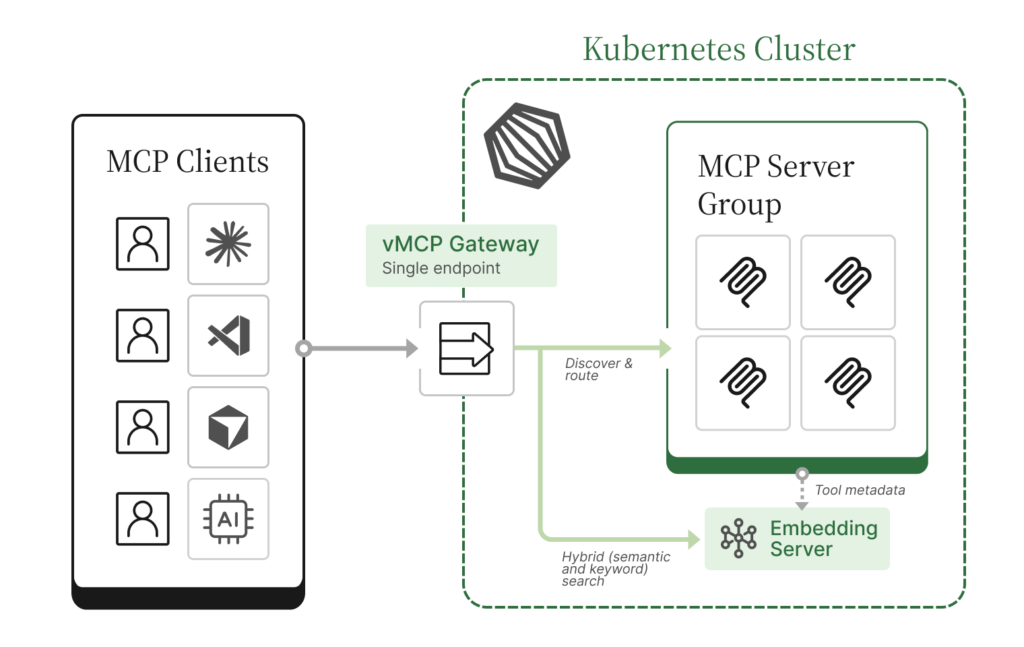
What you actually want — for users and AI agents alike — is to configure it once, in one place, and have everyone benefit automatically. That’s exactly what Stacklok now delivers through the vMCP and Operator.
How the Optimizer works
The core idea is simple. Instead of sending your AI agent the full list of every tool from every MCP server (which can easily run to hundreds of descriptions), the Optimizer collapses them into two meta-tools:
- Your agent receives a prompt that requires tool use.
- It calls find_tool with a natural language description of what it needs.
- The Optimizer runs hybrid search (semantic and keyword) against all registered tools.
- Only the relevant tools come back — typically 8 instead of 200+.
- The agent calls call_tool to invoke the one it needs.
Your agent never sees the full tool catalog. It discovers tools on demand, pays only for the descriptions it actually needs, and the LLM stays focused on fewer, more relevant options.
For a deeper dive into the mechanics and benchmarks, see the original Optimizer blog post.
All the power of vMCP, now with cost savings
If you’re already running Stacklok in Kubernetes, you’re likely using the vMCP— a unified gateway that aggregates multiple MCP servers behind a single endpoint. vMCP gives you:
- Unified gateway. One endpoint for all your MCP servers. Onboarding a new team member means sharing one URL, not configuring five connections.
- Authentication and authorization. Centralized auth for incoming clients (OIDC, anonymous, etc.) and outgoing connections, so you can enforce access policies without modifying each MCP server.
- Aggregation and conflict resolution. Automatic prefixing, priority ordering, or manual overrides when tool names collide across MCP servers.
The Optimizer adds one more layer on top:
- Token optimization. Every tool behind the gateway gets indexed. Clients see only find_tool and call_tool instead of the full catalog.
The savings are real. The original Optimizer blog post walks through the benchmarks in detail, showing 60-85% token reductions per request. In a head-to-head comparison with Anthropic’s tool search tool, the Optimizer matched or exceeded a first-party solution.
Token savings aren’t the only benefit. Fewer tool descriptions means less noise for the LLM to wade through, which means better tool selection and fewer hallucinated tool calls. You’re saving tokens and getting better results.
How to deploy the Optimizer in Kubernetes
The Kubernetes setup is deliberately minimal. You need two things: an EmbeddingServer and a reference to it from your VirtualMCPServer.
Step 1: Deploy an EmbeddingServer
The EmbeddingServer Custom Resource Definition (CRD) manages a shared embedding model for the whole team. With sensible defaults baked in, the minimal configuration is just this:
apiVersion: toolhive.stacklok.dev/v1alpha1
kind: EmbeddingServer
metadata:
  name: optimizer-embedding
spec: {}The operator defaults to BAAI/bge-small-en-v1.5 as the model and runs the HuggingFace Text Embeddings Inference server. You can increase the replica count via spec.replicas to match your team’s throughput needs. One shared instance serves every vMCP in the namespace. For all available configuration options, see the Optimizer docs.
Step 2: Reference it from your VirtualMCPServer
Add a single field to your existing VirtualMCPServer:
embeddingServerRef:
name: optimizer-embeddingThat’s the only change. When the operator sees embeddingServerRef without an explicit optimizer config block, it auto-populates the optimizer with sensible defaults and resolves the embedding server URL automatically. You don’t need any manual wiring.
For finer control — tuning search parameters, timeouts, and more — see the Optimizer docs for the full reference.
The cost savings add up
The per-request savings are compelling on their own, but they compound quickly when you multiply across a team: every team member, every request, every day. At typical API pricing, those savings add up fast. Fewer tokens also means faster responses and lower latency for your organization.
Beyond the raw savings, the Kubernetes approach gives you operational advantages:
- GitOps-friendly. EmbeddingServer and VirtualMCPServer configurations live in Git, get reviewed in PRs, and deploy through your existing CI/CD pipeline. That gives you full change history and rollback for compliance requirements.
- One shared embedding server. Instead of every machine running a local embedding model, one instance serves the whole team. Less resource waste, consistent behavior.
- Zero end-user setup. Users point their MCP client at the vMCP endpoint. The Optimizer is transparent; they don’t need to know it’s there.
- Centralized security boundary. All tool discovery flows through one place, giving you a single point to audit and control which tools your team can access.
Resources
Here’s everything referenced above and some extra resources:
- Optimizer docs: Configuration guide
- vMCP blog post: Introducing Virtual MCP Server: a unified gateway for multi-MCP workflows
- vMCP docs: Virtual MCP Server configuration guide
- Quickstart example: vmcp_optimizer_quickstart.yaml: deploys several MCP backends with a fully auto-configured optimizer
- All options example: vmcp_optimizer_all_options.yaml: every tuning knob exposed
- Original Optimizer blog: Cut Token Waste from Your AI Workflow
- ToolHive GitHub: github.com/stacklok/toolhive
Want to see what Stacklok can do for your organization? Book a demo or get started right away with ToolHive, our open source project. Join the conversation and engage directly with our team on Discord.
March 11, 2026
Alejandro Ponce de León
Software Engineer
Alejandro is a software engineer specializing in AI agent infrastructure and Model Context Protocol (MCP) tooling. He architected the MCP Optimizer, a hybrid semantic and keyword search system that achieves 94% accuracy in tool selection and mcp-tef, a testing and evaluation framework that helps developers validate MCP tool quality before production.
More by Alejandro Ponce de León