Build your first enterprise MCP server with GitHub Copilot
Ever wondered how to bridge the gap between your company’s private knowledge and AI assistants? You’re about to vibecode your way there.
What all the fuss with MCP is about
Back in November 2022, the world changed when OpenAI launched ChatGPT. It wasn’t the first Large Language Model (LLM), but it was the most capable at the time, and most importantly, it was available for everyone to explore. To make a small analogy: it got to the moon first. LLMs sparked everyone’s imagination and forever changed the way we work. Maybe that’s a little far-fetched, but they definitely boosted productivity across many areas.
Yet LLMs weren’t (and still aren’t) all-mighty. They’ve been trained on vast amounts of internet content, but they have two critical limitations:
- They’re not trained on private content. No company wikis, internal docs, or how-tos.
- They have a knowledge cutoff. Their training stops at a fixed date, usually months in the past.
So if you ask ChatGPT something like “How was feature X designed in product Y, and how can I integrate it with my new feature Z?”, it will have no idea what you’re talking about. First of all, it would most probably not have access to the implementation details, since it would fall into the private content of an organization. Even if it did, there’s no guarantee because it’s frozen in time; it doesn’t know what’s changed in the world since that cutoff.
MCP to the rescue
Fortunately, both problems can be solved with tools. Tools empower LLMs with capabilities beyond their training. To solve the two issues above, we can create tools that tell the LLM: “When you’re asked about product X at company Y, use tool Z to get the most up-to-date information.” That tool might, for example, search an internal knowledge base.
MCP (Model Context Protocol) has quickly become the standard for tool calling. Modern AI systems have two essential parts: the client (VS Code, Cursor, ChatGPT, Claude Code, etc.) and the model itself. Tools live on the client side. When the model doesn’t know something, it calls a tool that the client executes. Originally introduced by Anthropic, MCP’s open design and community adoption have made it the clear industry standard, now supported by OpenAI, Google, Microsoft, and others. That means you can write an MCP server once and use it with your favorite clients.
Building your first MCP, the AI scrappy way
Let’s say your boss just tasked you with connecting your AI assistants to the corporate Confluence wiki. This is a perfect use case for MCP; you need to expose enterprise knowledge to AI tools in a standardized way.
For this tutorial, we’ll assume you already have a querying system in place, whether that’s a Retrieval Augmented Generation (RAG) pipeline, a search API, or another knowledge retrieval mechanism. Our job is to wrap that existing system with an MCP server so AI assistants can access it.
Our approach: vibecoding
We’re going to build this MCP server using what Andrej Karpathy sarcastically called “vibecoding“: letting LLMs do most, if not all, of the code. The term spread like wildfire because, well, it works surprisingly well for certain tasks. It’s not a silver bullet, but it’s perfect for handling boilerplate code and getting something functional quickly.
Ingredients
- Python 3.13+
- VS Code with Copilot
- uv for package management
Why Copilot?
While editors like Cursor, Codex, Windsurf, and Claude Code have gained wide popularity for their deep AI integration, GitHub Copilot remains the most widely available option for enterprise developers. It’s often already included in Microsoft or GitHub contracts, making it simple to deploy without extra approvals. We’ll still use Copilot here because it’s what most teams already have available and will get the job done.
Implementation
The initial prompt
Getting started with AI-assisted development is all about setting clear expectations. Here’s the first prompt I used to kick off the project. Being specific about tooling and goals helps guide the AI toward the implementation you actually want. After this initial prompt, we should have the scaffolding of the project and most of the implementation ready.
This is a new project called enterprise-mcp. It is a Python project using 3.13 or greater. The project is meant to be an MCP server that will access enterprise knowledge and make it available to LLMs. The project should:
– Use uv as package manager
– For adding packages use `uv add <package_name>`
– All configuration should be centralized in pyproject.toml file
– Use uv dependency groups when adding development dependencies like pytest, e.g. `uv add pytest –dev` or `uv add –group dev pytest`
– I would also like a Taskfile to centralize running commands, like `task format`, `task test`, or `task typecheck`
– Use `ruff` for linting and formatting
– Use `ty` for typechecking https://docs.astral.sh/ty/
– Use `async` functions wherever possible and `asyncio.gather` when parallelizing multiple tasks
– Use the official Python MCP SDK: https://github.com/modelcontextprotocol/python-sdk
– For now, make a single tool called search_enterprise_knowledge. Make sure the tool has appropriate descriptions that are descriptive enough for LLM usage- Make the implementation with tests. I don’t care so much about unit tests but about testing the overall functionality of the application
Where the AI got confused
Even with a detailed prompt, the first pass required some corrections. Still, we had a working implementation even at the first prompt, which is also quite impressive. Two main issues emerged, both likely related to the AI’s knowledge cutoff:
1. Misunderstanding the MCP SDK
Instead of using the official Python SDK, Copilot attempted to semi-reimplement the MCP protocol from scratch, creating custom list_tools and call_tool endpoints. Since the MCP SDK is fairly recent, it wasn’t in the training data, and crucially, the AI didn’t check the documentation before implementing.
2. Using Mypy instead of Ty
Similar story here. The AI defaulted to the more established Mypy rather than looking up the newer Ty package I’d specified.
Manual refinements
Beyond fixing the AI’s mistakes, I made some personal preference edits:
- Structure of pyproject.toml. No coding assistant until this day nails my pyproject.toml preferences on the first try (it may well be a me problem and not an AI problem). I referenced configurations from past projects I liked and adapted them here.
- Taskfile.yml adjustments. Same deal with the Taskfile.yml. That said, the AI got me 80-90% of the way there, which is pretty remarkable.
Iterating with prompt #2
After the initial implementation and manual edits, a few minor improvements remained. Rather than handle them manually, I asked Copilot to finish the job because it would certainly take less time than I would:
I have made some changes in my server.py to correctly use the Python SDK. I want you to:
1. Transform my server to a streamable HTTP server.
2. Add a comprehensive docstring for my handle_search method so that it’s usable by LLMs whenever enterprise knowledge is needed.Check the documentation of the Python SDK to know how to correctly transform the server to streamable HTTP: https://github.com/modelcontextprotocol/python-sdk
Closing the loop
The final step is updating project memory: the context file that helps future AI sessions (and human developers) understand your project quickly. For most coding assistants, this lives in AGENTS.md or CLAUDE.md at the project root. Most coding assistants recognize either. It’s a good place to:
- Document the project structure, so the agent knows where to implement a new feature or fix a bug
- Outline the project’s best practices
- Give instructions that can be repeated across runs, e.g., always run unit tests along with code linting
Perfect, 3 final tasks after some manual modifications:
1. Make sure my commands `task format`, `task typecheck` and `task test` work and return without errors
2. Update the file AGENTS.md with relevant context information for coding agents. Take into account the best practices signaled at the beginning, like centralizing everything in pyproject.toml and using `task ..` commands to run relevant project commands. The code formatting and tests commands should be used every time a coding task is finished. Read the repo again for any other relevant information3. Finally, update a README.md with a summary of the project and the development process
Key lessons
Tools are not API endpoints
This is crucial to understand when building MCP servers: an MCP tool is fundamentally different from an API endpoint, even though it’s tempting to map them one-to-one.
API endpoints are designed as small, atomic, reusable operations. They’re the building blocks you compose together: one endpoint to fetch user data, another to update preferences, another to send notifications. Each is focused and modular, meant to serve multiple use cases across your application.
MCP tools, by contrast, are meant to accomplish complete deterministic workflows or actions. Think of an API as giving you a toolbox of small buttons, each doing one thing, that you wire together. An MCP tool is a single big button that says “do the thing.” It handles an entire task from start to finish.
For example, instead of separate tools for “search documents,” “filter by date,” and “format results,” you’d create one search_enterprise_knowledge tool that handles the full workflow of finding, filtering, and returning relevant information in one shot.
You’re still accountable
Whatever code the AI produces, you own it. If it breaks in production, you can’t blame Copilot or Claude. Humans remain accountable for the code we ship.
This means you should always review what gets generated. Not necessarily line-by-line, but at minimum: understand what it does, verify it follows your standards, and run it through your normal quality checks. A quick sanity check is never wasted time, especially when you’re the one who’ll be called at 2am to fix it.
Testing the MCP server
For this first iteration, it’s better to remove all variables like coding assistants and configuration files. The easiest way to do that is with the MCP Inspector, a tool from Anthropic for inspecting an MCP server and querying it directly. To run the inspector:
npx -y @modelcontextprotocol/inspectorExample response
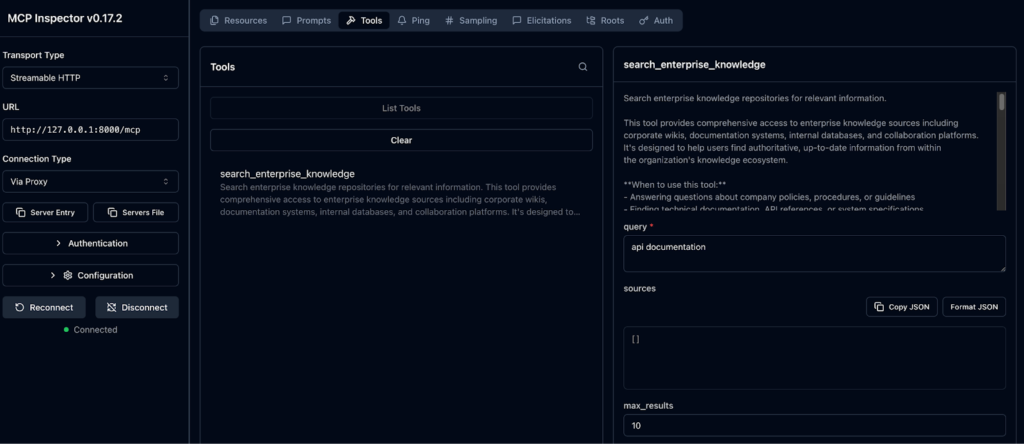
## Result 1
**Title:** API Documentation - Authentication
**Content:**
# API Authentication Guide
## Overview
Our REST API uses OAuth 2.0 for authentication.
## Getting Started
1. Register your application
2. Obtain client credentials
3. Request access token
4. Include token in requests
## Example
````
curl -H "Authorization: Bearer YOUR_TOKEN" \
  https://api.company.com/v1/users
````
Access tokens expire after 1 hour.
**Metadata:**
- author: API Team
- created: 2024-02-01
- last_updated: 2024-10-20
- tags: ['api', 'authentication', 'oauth', 'documentation']
- source: confluence
**URL:** https://company.atlassian.net/wiki/spaces/API/pages/987654321What’s next
We’ve successfully built a working MCP server using Copilot and vibecoding, ready to access enterprise knowledge through a standardized protocol!
By letting GitHub Copilot handle most of the boilerplate code, we created a functional Python MCP server with proper tooling, testing, and documentation, all while maintaining code quality and best practices.
Full code repository: https://github.com/aponcedeleonch/enterprise-mcp
In the next blog post, we’re taking this further by introducing ToolHive, a powerful platform that makes deploying and managing MCP servers effortless. ToolHive offers:
- Instant deployment using Docker containers or source packages (Python, TypeScript, or Go)
- Secure by default with isolated containers, customizable permissions, and encrypted secrets management
- Seamless integration with GitHub Copilot, Cursor, and other popular AI clients
- Enterprise-ready features, including OAuth-based authorization and Kubernetes deployment via the ToolHive Kubernetes Operator
- A curated registry of verified MCP servers you can discover and run immediately, or create your own custom registry
Stay tuned to learn how to evolve our enterprise MCP server from a prototype into a production-ready service!
January 30, 2026

Alejandro Ponce de León
Software Engineer
Alejandro is a software engineer specializing in AI agent infrastructure and Model Context Protocol (MCP) tooling. He architected the MCP Optimizer, a hybrid semantic and keyword search system that achieves 94% accuracy in tool selection and mcp-tef, a testing and evaluation framework that helps developers validate MCP tool quality before production.
More by Alejandro Ponce de León